
ManyCam for Yahoo Messenger
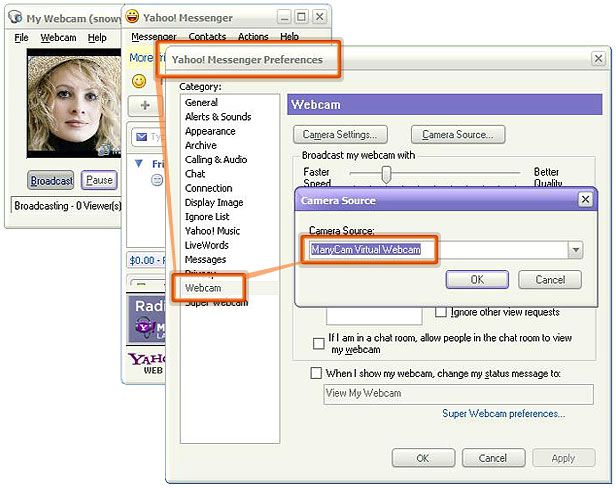
In Yahoo Messenger, open your "Preferences" (Main menu - Messenger - Preferences or open the My Webcam window and click on the Main menu - File - Preferences), click on the "Video&Voice" option and select "ManyCam Virtual Webcam" or "ManyCam Video Source" in the "Camera" dropdown list.
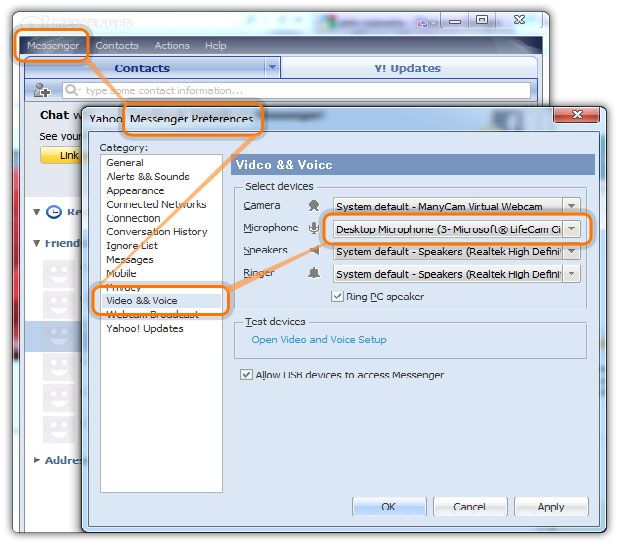
To choose ManyCam as the audio source, open your "Preferences" (Main menu - Messenger - Preferences or open the My Webcam window and click on the Main menu - File - Preferences), click on the "Video&Voice" option and select "ManyCam Virtual Microphone" in the "Microphone" dropdown list.
Was this article helpful?
32 out of 38 found this helpful
Can’t find what you’re looking for? Contact Helpdesk