
ManyCam for iChat
Before using ManyCam in your application (iChat, Photo Booth:) you should run ManyCam. See the ManyCam icon in the menu bar:

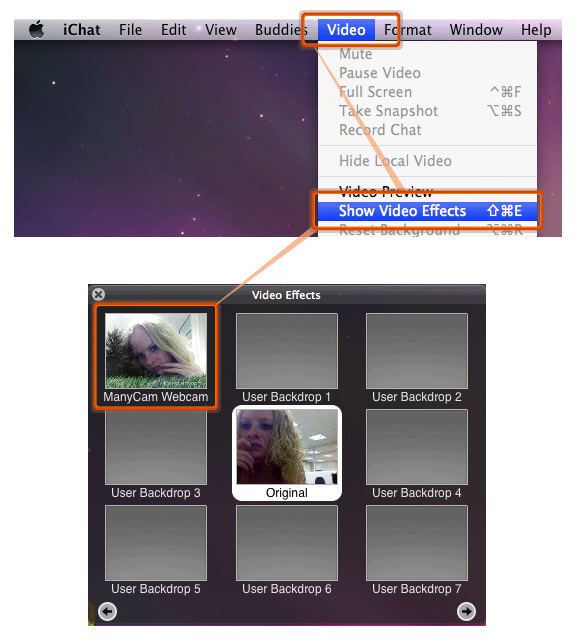
In iChat open the "Effects" window (Main menu - Video - Show Video Effects) and Select the ManyCam Webcam Effect.
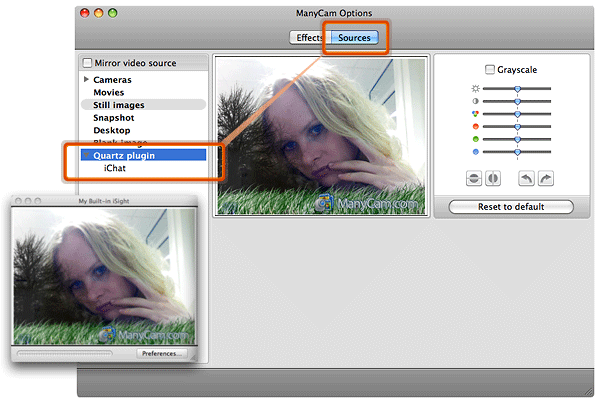
In the ManyCam Sources window you should see iChat - Quartz plugin. It is the source that is currently used by iChat. For example another source would be the iSight webcam.
Was this article helpful?
85 out of 99 found this helpful
Can’t find what you’re looking for? Contact Helpdesk